

Build Your First AI Work System Agent
Start with one recurring meeting, one useful output, and a process you can inspect when the AI gets something wrong.

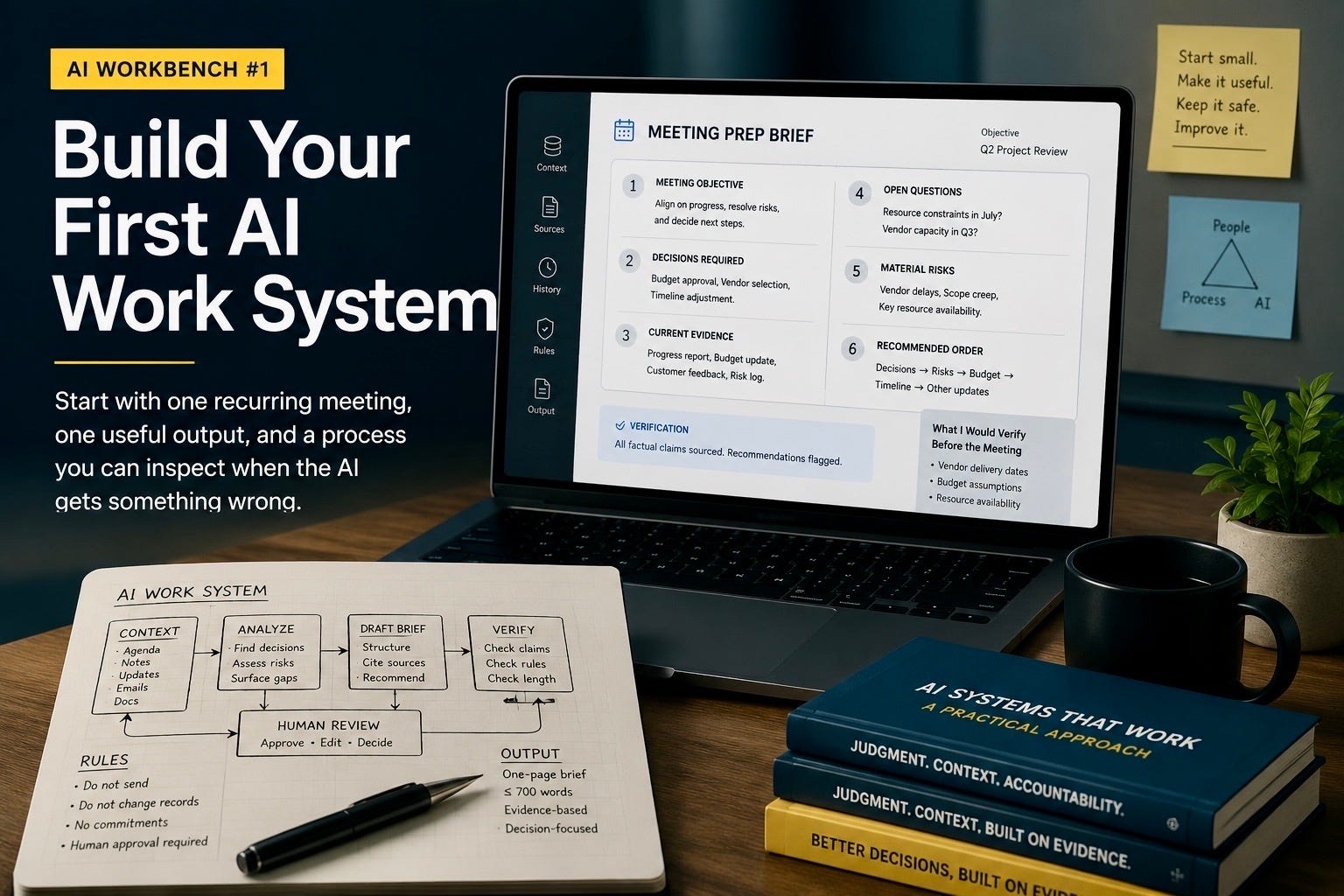
The quickest way to understand AI agents is to build one small system for work you already know.
You do not need to write code. You do not need a complex automation platform. You do not need to create a digital employee with a name, biography, and suspiciously confident profile picture.
Start with one recurring piece of work that consumes attention and produces a recognizable output.
For this guide, we will build a meeting-preparation system.
Before an important meeting, it will review the relevant material, identify the decisions that need attention, separate established facts from unresolved claims, flag missing information, and prepare a concise briefing.
The meeting could be a weekly team review, a customer conversation, a project checkpoint, a budget discussion, an architecture review, a sales call, or a planning session. The subject changes, but the underlying job remains consistent:
Turn scattered meeting context into a brief that helps me make better decisions.
This is a good first AI work system because nearly everyone understands the job. You already know what useful preparation looks like. You can recognize a missed decision, an unsupported claim, an irrelevant detail, or a recommendation that does not fit the situation.
That matters because the hardest part of building with AI is not getting it to produce something. It is deciding whether what it produced is any good.
What makes this an AI work system?
A normal AI conversation begins when you ask a question and ends when you receive an answer.
An AI work system has more structure. It has:
A defined job
A repeatable sequence of steps
Relevant context
A specific output
Rules about what the AI may and may not do
A way to check the result
A process for improving future runs
At its simplest, an agentic system is a workflow in which AI gathers or receives context, performs several connected steps, checks its work, and stops when human judgment or authority is required.
The word “agent” often makes the idea sound more autonomous and complicated than it needs to be. Your first system does not need to send messages, access every company application, or make decisions on your behalf.
It needs to complete one useful job reliably.
Begin with a job you can judge
Avoid starting with a universal personal assistant.
“Help me with my work” sounds flexible, but it gives the AI no stable definition of success. One day it summarizes a document. The next day it drafts an email. Then it offers project advice based on incomplete context. When the result disappoints you, it becomes difficult to identify what failed because the system is attempting a different job every time.
Choose a narrow task with a visible output.
Good first projects include:
Preparing for a recurring meeting
Turning interview notes into a candidate comparison
Reviewing a proposal against a defined set of requirements
Converting research into a one-page briefing
Organizing customer feedback into themes and unresolved questions
Checking a document for missing evidence, inconsistencies, or unclear ownership
Drafting a weekly project update from approved source material
For this first build, choose one meeting that occurs regularly and matters enough to justify preparation.
Do not choose the meeting with the largest number of documents. Choose the one where better preparation could improve the discussion or decision.
Step 1: Define the job in one sentence
Write one sentence describing what the system completes.
A weak definition would be:
Help me prepare for meetings.
A stronger definition would be:
Before the weekly project review, create a one-page brief identifying the decisions required, current evidence, unresolved questions, material risks, and recommended discussion order.
The second version creates a boundary. It also gives you a way to determine whether the system succeeded.
A good job definition usually contains four elements:
The triggering situation
The material the system will use
The output it will produce
The purpose of that output
For example:
Before each customer review, analyze the agenda, previous notes, account update, and recent correspondence, then prepare a briefing that identifies customer concerns, commitments already made, unresolved decisions, and questions that require confirmation.
The sentence does not need to describe every step. It needs to make the job clear enough that another person could understand what “finished” means.
Step 2: Decide what the finished output looks like
AI systems become unreliable when the person building them has not defined completion.
For the meeting-preparation system, the briefing could contain six sections.
Meeting objective
What must be accomplished during the meeting?
Decisions required
Which choices need approval, rejection, ownership, escalation, or further evidence?
Current evidence
Which relevant facts are supported by the material provided?
Open questions
What information is missing, disputed, inconsistent, or unclear?
Material risks
What could affect cost, timing, quality, customers, security, delivery, or reputation?
Recommended discussion order
Which subjects should be addressed first, and why?
Set a length limit. A one-page brief forces prioritization.
Without a limit, the AI may create a well-organized version of everything it received. That leaves you with the same information problem in a cleaner format.
Your output requirements might look like this:
Produce no more than 700 words. Identify no more than five decisions. Separate facts, interpretations, and recommendations. Name the source for every material factual statement. Mark missing information explicitly. Do not invent a recommendation when the evidence is insufficient.
These requirements are more important than clever prompt wording. They define what quality means.
Step 3: Gather the minimum useful context
The system needs enough information to perform the job. Giving it everything you can find does not necessarily improve the result.
For one meeting, the minimum context might include:
The meeting invitation or agenda
Notes from the previous meeting
The latest project, account, or team update
Relevant email or message excerpts
A decision or action log
One or two supporting documents
Supply these inputs manually for the first few runs.
Manual input may feel less sophisticated than connecting your calendar, inbox, document system, and project tools. It is also much easier to inspect.
You can see exactly what the AI received. When the output is wrong, you can determine whether the system misunderstood the information or never received the information it needed.
Broad access creates several problems at once:
Irrelevant material can overwhelm useful context
Old information can compete with current information
Sensitive material may enter the workflow unnecessarily
You may not know which source influenced the answer
Errors become harder to investigate
Start with a small, deliberate context package.
A note on workplace information: use only AI tools approved by your employer for the type of information involved. Begin with public, synthetic, or non-sensitive material until you understand how the service stores, processes, and retains what you provide.
Step 4: Map the work before writing the prompt
Write down the sequence a capable colleague would follow.
For the meeting-preparation system, the workflow might be:
Read the agenda → review the previous notes → identify unresolved decisions → inspect new evidence → detect contradictions or missing information → rank the issues → draft the briefing → verify the claims → wait for human review
This sequence reveals where judgment is needed and where simple rules are enough.
A rule can enforce the 700-word limit.
A rule can require every proposed action to have an owner.
A rule can prevent the system from sending the briefing.
AI judgment is more useful when deciding whether two documents conflict, identifying which unresolved issue matters most, or explaining why one subject should be discussed before another.
Use fixed rules where fixed rules work. Every unnecessary judgment step creates another opportunity for inconsistency.
Step 5: Organize the context into layers
Treating all context as one undifferentiated pile makes the system harder to control.
Use four layers.
Standing context
This describes your role and the environment in which you work.
It could include:
Your responsibilities
The types of decisions you own
Your preferred briefing style
Important terminology
Recurring constraints
Subjects that always require escalation
Standing context changes slowly.
Meeting context
This contains information specific to the upcoming meeting:
Agenda
Participants
Current status
Recent documents
New correspondence
Proposed decisions
Meeting context changes with each run.
Decision history
This records what happened previously:
Decisions already made
Actions assigned
Owners confirmed
Deadlines agreed
Items deferred
Assumptions that proved incorrect
Without decision history, the AI may reopen settled questions or present an existing commitment as a new recommendation.
Reference material
This contains information that should be treated as authoritative:
Policies
Contracts
Project plans
Product documentation
Approved budgets
Service commitments
Standards or procedures
Label authoritative sources clearly. Otherwise, the system may treat an informal comment and an approved policy as equally reliable.
Step 6: Set the authority boundary
A useful AI system needs a clear limit on what it may do.
For the first version, allow it to:
Read the supplied material
Organize information
Identify possible decisions
Flag inconsistencies
Draft questions
Draft the briefing
Recommend areas for review
Do not allow it to:
Send the briefing
Contact meeting participants
Modify source documents
Assign work
Approve a proposal
Commit funds
Change a project plan
Record a decision as final
Present an interpretation as company policy
The system may prepare an action. You approve the action.
Write the boundary directly into its instructions:
You may analyze and draft. You may not send messages, modify records, assign actions, make commitments, or treat a proposed decision as approved. Clearly identify every item requiring human judgment.
This is not only a safety measure. It improves the output by forcing the AI to distinguish between analysis and authority.
Step 7: Give the system its operating instructions
Create a dedicated project, workspace, reusable conversation, or custom agent inside your approved AI environment.
Add your standing context and use the following instruction as a starting point:
You are my meeting-preparation assistant.
Your job is to turn the material I provide for one meeting into a concise, evidence-based briefing.
For every run:
State the meeting objective.
Identify up to five decisions that require discussion, approval, rejection, ownership, escalation, or additional evidence.
Separate confirmed facts, participant claims, your interpretations, and your recommendations.
Name the supplied source for every material factual statement.
Identify contradictions, missing evidence, and unresolved assumptions.
Do not infer agreement from silence.
Do not reopen decisions already recorded as final unless new evidence directly challenges them.
Recommend a discussion order based on consequence and urgency.
Mark every recommendation that depends on incomplete evidence.
Produce no more than 700 words.
You may analyze and draft. You may not send messages, update documents, assign work, make commitments, or record decisions as final.
End with a section titled “What I Would Verify Before the Meeting.”
The instruction gives the AI a job, a method, an output format, and an authority boundary.
It still needs the right meeting material. No prompt can recover information that was never provided.
Step 8: Add a verification pass
A polished briefing can still be wrong.
Before accepting the result, require the system to review its own draft against explicit checks.
Use a second instruction:
Review the draft briefing before presenting the final version.
Confirm that:
Every material factual statement has a supplied source.
No participant claim is presented as an established fact.
Every proposed decision is genuinely unresolved.
Previously approved decisions are not described as open.
Recommendations are separated from evidence.
Missing information is identified.
No person is assigned an action without confirmation.
The briefing stays within 700 words.
List any failed checks, correct the draft, and then produce the revised briefing.
This will not eliminate every mistake. It will catch a useful class of preventable failures: unsupported claims, forgotten constraints, reopened decisions, and recommendations presented with more confidence than the evidence supports.
Verification works best when the checks are concrete.
“Make sure this is good” is not a test.
Step 9: Record what the system gets wrong
The system improves when you preserve useful corrections.
After each meeting, record:
Which important information was missing
Which topic received too much attention
Which decision was misunderstood
Which recommendation was useful
Which claim lacked support
Which question improved the discussion
Which information should be included next time
Store corrections as short operating rules rather than long meeting histories.
For example:
Budget changes below $25,000 do not require executive approval.
Dates in the signed statement of work take precedence over dates mentioned in meeting notes.
When security approval is pending, describe it as a dependency rather than a delivery delay.
Do not treat a suggested owner as confirmed until the decision log names that person.
These rules capture the practical knowledge that changes future results.
A system does not become better simply because it remembers more. It becomes better when it remembers the distinctions that matter.
Step 10: Run it manually before adding automation
Use the system for three to five meetings before connecting more tools.
During those runs, inspect:
Whether it identifies the right decisions
Whether it uses sources accurately
Whether it distinguishes facts from opinions
Whether it notices missing information
Whether it respects settled decisions
Whether the output saves preparation time
Whether the briefing improves the meeting
Fix one recurring failure at a time.
When the system misses an important contractual constraint, include the contract or add a rule requiring it to check the relevant clause.
When it produces too much detail, tighten the output requirements.
When it makes recommendations outside your authority, clarify the decision boundary.
When it repeatedly uses stale information, improve the way sources are dated and labeled.
Do not add more agents, memory, integrations, or autonomy until you know which problem each addition will solve.
Automation works best after the process is stable.
What the first working version looks like
Your first version may be modest.
You create a dedicated AI workspace. You provide your role, briefing format, recurring meeting purpose, and standing rules. Before each meeting, you add the agenda, previous notes, current update, and selected correspondence.
The AI produces a draft. It checks the draft. You review the result, correct it, and take the final briefing into the meeting.
That is already an agentic work system.
It has:
A defined job
A repeatable workflow
Structured context
A clear output
Reasoning steps
Authority limits
Verification
Human approval
A correction loop
The value does not come from making the system seem human. It comes from making the work inspectable and improvable.
When to expand the system
Once the manual version performs reliably, add capabilities one at a time.
A calendar connection can retrieve the meeting agenda and participant list.
A document connection can locate the latest approved project update.
An email connection can find recent correspondence from named participants.
A scheduled workflow can begin preparing the briefing at a fixed time before the meeting.
A follow-up step can draft meeting notes or proposed actions for your review.
Each connection creates a new data-access decision. Each action creates a new authority decision. Each source creates another way for irrelevant, outdated, or sensitive information to affect the result.
Add a capability only when it removes a specific manual step and you can explain how you will check its behavior.
A sensible progression is:
Manual inputs → reliable briefing → approved data connections → scheduled preparation → drafted follow-up → separately approved actions
Many useful work systems should stop before the final stage.
A system that prepares you exceptionally well may create more value than one that acts broadly on your behalf.
What building this teaches you
After several runs, ideas that once sounded abstract become concrete.
You see that context quality matters more than prompt cleverness.
You discover that memory is useful only when it preserves the right distinctions.
You understand why access to a tool does not automatically imply permission to use it.
You notice that verification requires explicit tests.
You learn that AI autonomy becomes consequential when the system can communicate externally, modify a record, spend money, assign work, or create a commitment.
These lessons are difficult to absorb from product demonstrations because their importance appears when a system fails.
A working system gives you something to inspect, correct, and improve. It also changes the questions you ask when someone proposes a more ambitious AI system at work.
You begin asking:
What job is the system expected to complete?
Which information can it trust?
Which tools can it access?
Which actions require approval?
How are errors detected?
Which decisions are already settled?
Where will the record of its work live?
Who is accountable when it gets something wrong?
That is practical AI fluency.
Start with one meeting. Build one useful briefing. Keep the inputs controlled, the output specific, and the authority limited.
You will learn more from correcting a small system you understand than from watching another demonstration of an AI assistant that claims it can do everything.